Windows
Missing audio device
Speakers missing or not functioning?
Applications on your PC can't emit sound without an audio device.
Run the Windows troubleshooter
AudioRelay can work with any audio device, the Windows troubleshooter will enable your device if it can find it.
- Right-click on the sound icon in the lower right corner of your screen
- Click on Troubleshoot sound problems
- Follow the instructions
You can come back to AudioRelay if the troubleshooter managed to fix anything
Virtual audio device
A virtual audio device can replace a real one. Applications on your PC will emit their sound to this device which will then be received by AudioRelay.
Installation
- Visit vb-audio.com
- Click on the download button
- Extract all the files from the downloaded ZIP
- Depending on your version of Windows, run this executable (as administrator)
VBCABLE_Setup_x64.exefor a 64-bit versionVBCABLE_Setup.exefor a 32-bit version
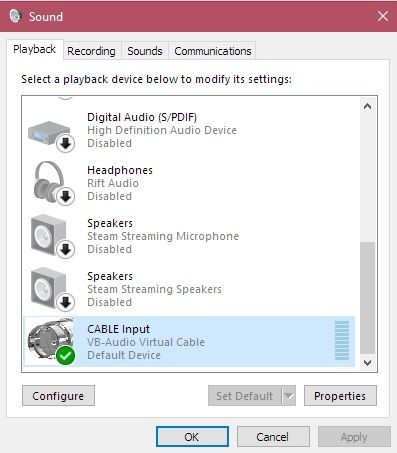
The CABLE device should now appear in your settings as below (A reboot could be necessary)
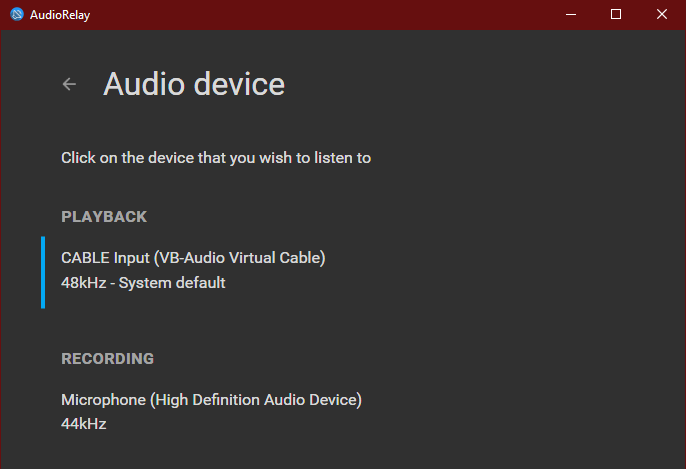
Return to AudioRelay, and make sure that it is selected in the Audio device section.